- The situation
- Claire checks a supplier's public profile on the computer in her boutique, which her staff also use.
- What they did
- She opens a private window so the visit and any search stay out of the shared history, and closes it when she is done.
Incognito Instagram viewer
What a private or incognito browser window does when you open Instagram, and what it does not: what Instagram, your network and the account owner can each see, and how a viewer that needs no login differs.

Does incognito mode let you view Instagram anonymously?
Partly, and only on your own deviceA private window keeps the visit out of your browser's history and starts you signed out. It does not hide your address from Instagram or your network. Profile visits are never recorded for the owner; story views are recorded only when you watch while signed in.
- 1
A private window clears history, cookies and form entries on your device when it closes.
- 2
Instagram, your provider and your network still see the connection.
- 3
Signed out, Instagram shows public profiles but asks for a login before stories.
- 4
A viewer plays public stories by username, with no login, in any window.
Three things a private window does on your device.
Every major browser has one: Incognito in Chrome, Private Browsing in Safari and Firefox, InPrivate in Edge. They work the same way.
Starts with a clean slate
A new private window opens with no cookies from your normal browsing, so you are signed out of Instagram and every other site.
Forgets when it closes
Closing the window deletes its history, cookies, site data and anything typed into forms during that session.
Keeps logins from being saved
Signing in to a site in a private window does not leave you signed in after the window closes, which helps on a shared computer.
Keeps what you chose to keep
Files you download and bookmarks you add stay on the device after the window closes.
Works the same on a phone
Mobile browsers have the same mode, with the same limits, opened from the tabs screen.
Hides nothing from the sites
Everything above happens on your device. The websites you open see the visit as they would in a normal window.
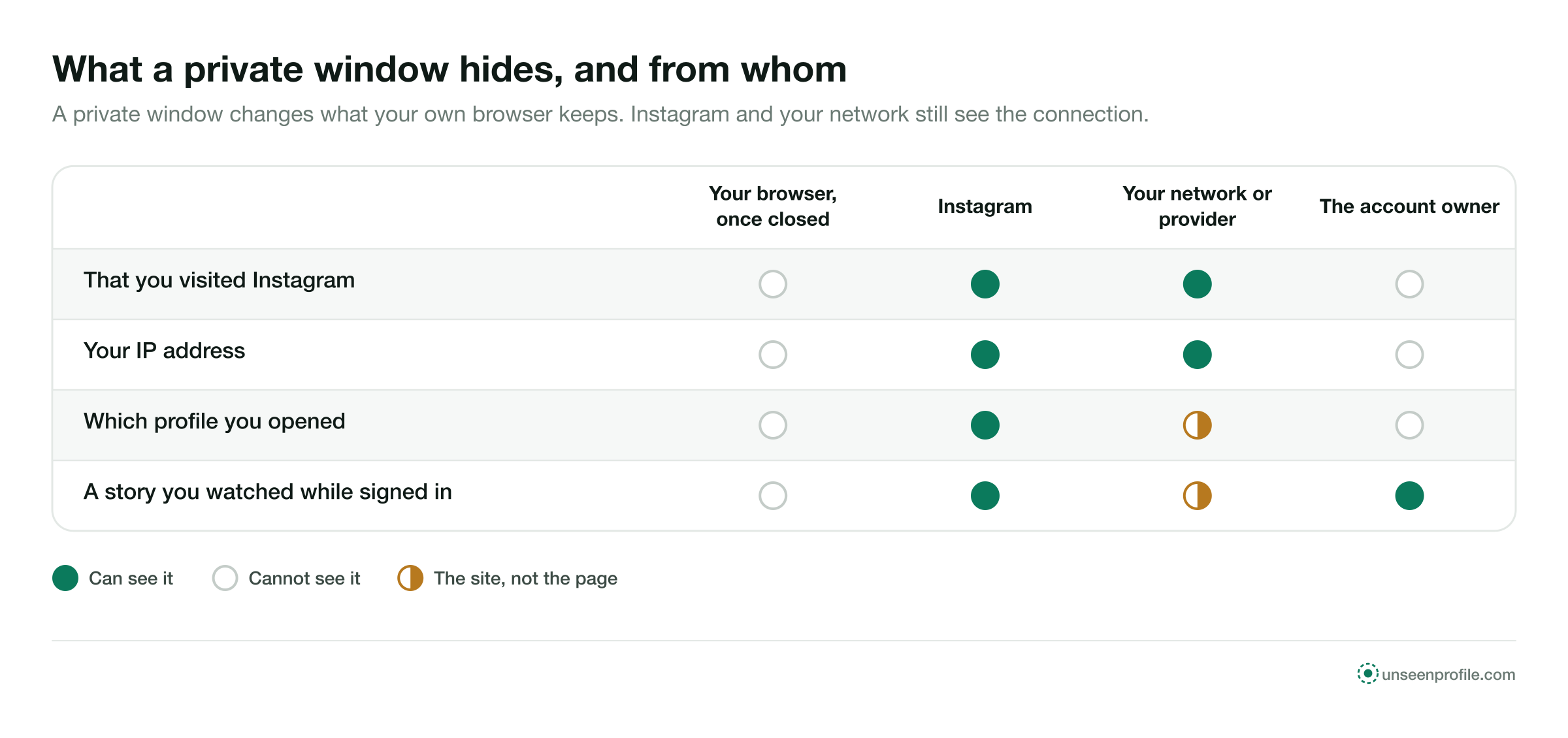
Three parties, and what each one can see.
A visit to an Instagram profile in a private window is seen from three sides. The private window changes only one of them.
Instagram loads over an encrypted connection, so a network sees that you connected to Instagram, not which profile or post you opened.
Instagram does not show any account a list of who visited its profile, whichever window or device the visit came from.
Signed out, Instagram shows a little and then asks you to log in.
Open instagram.com in a private window and you arrive signed out. Instagram shows a public profile's header and some of its posts to a signed-out visitor, then puts a login prompt in front of the page after a short while.
Stories are the clearest limit. A signed-out visitor cannot play them on instagram.com, so the private window alone does not let you watch a story. A viewer differs here: it plays public stories and highlights from the username, signed out, in any window.
Signed out on instagram.com, you get
- A public profile's picture, name, bio and counts
- Some of its posts, for a while
- A login prompt after a short time
- No stories until you log in
- Nothing at all from a private account beyond its header
A private window does not make a signed-in account anonymous.
The moment you log in to Instagram in a private window, every action is made by your account, the same as in the app.
Story views carry your name
Watching a story while signed in puts your account on the owner's viewer list for 48 hours after it was posted, private window or not.
Likes, comments and follows are public
Each one is made from your account and shows your name to the owner, as it would anywhere else.
Instagram links the activity to your account
What you do while signed in is part of your account's activity, whichever window you used.
Only the device forgets
When the window closes, the login and history leave that browser. Nothing changes on Instagram's side or the owner's.
Three steps, signed out, in any window.
A viewer works from the public username. It needs no Instagram account, so there is no login to carry your name, private window or not.
- 1
Open a private window if you like
A normal window works as well. The private one only keeps the visit out of your own history on that device.
- 2
Type the public username
Enter the handle. The profile header loads first, so you can check it is the right account.
- 3
Open stories, posts and highlights
Public stories play with no login and no name on the viewer list, unlike instagram.com signed out, which asks you to log in first.
A private window, a viewer, and both together.
Each option keeps something different private. Used together, a viewer in a private window covers both your device and the owner's list.
A private account's posts, stories and highlights are shown only to followers the owner approved. That holds in a normal window, a private window and every viewer.
Words that come up around private browsing.
Knowing these makes it easier to see what a private window covers and what it leaves out.
- Private window
- A browser window that does not keep history, cookies or form entries after it closes. Called Incognito in Chrome and InPrivate in Edge.
- Cookie
- A small file a site stores in your browser, used among other things to keep you signed in. A private window starts without your usual ones.
- IP address
- The address your connection uses on the internet. Every site you open sees it, in any window.
- Internet provider
- The company that connects you to the internet. It sees which sites you connect to, in any window.
- Encrypted connection
- A connection whose contents a network cannot read. It still shows which site you connected to.
- VPN
- A service that routes your connection through another address. It changes what sites and networks see; it does not open private accounts.
- Viewer list
- The signed-in accounts that watched a story, open to the owner for 48 hours, one entry per account.
What stays and what goes.
A private window has a simple life: it starts empty and empties itself again at the end.
- 1When you open it
No cookies, no logins
The window starts signed out of every site, with none of your normal browsing data.
- 2While it is open
It behaves like any window
Sites see your visits as usual. If you sign in to Instagram, your account is signed in for that window.
- 3When you close it
The device forgets
History, cookies, site data and form entries from the window are deleted. Downloads and bookmarks stay. Story lists you joined while signed in stay too.
Recorded for a profile visit, in any window
A story's viewer list stays open to the owner
Is all it takes to put your name on a list
Four ordinary reasons to open Instagram in a private window.
- The situation
- Emma opened a café's profile in a private window to see the day's specials, and Instagram asked her to log in before the story would play.
- What they did
- She typed the café's username into a viewer instead, which played the public story with no login.
- The situation
- Daniel was looking at a jeweller's posts for his partner's birthday on the family laptop.
- What they did
- He used a private window so the jeweller's pages did not appear in the browser's history or its suggestions.
- The situation
- Lena signed in to her own Instagram account on a library computer to answer a message.
- What they did
- She used a private window so the login was not saved, and closed every window before she left.
What a private window is good for.
A private window can
- Keeping a visit out of your browser history
- Signing in on a shared or public computer without saving the login
- Opening Instagram signed out without signing out of your normal window
- Using a viewer with nothing left in history afterwards
It cannot
- Hiding your IP address from Instagram or any site
- Hiding the sites you open from your network or provider
- Playing stories on instagram.com without a login
- Keeping your name off a story's list while signed in
- Opening a private account
Three rules for private browsing and Instagram.
A viewer works from a public username. A page that asks for your login is after your account, private window or not.
Some browsers let extensions work in private windows. An extension that promises private profiles wants permissions you should not give.
The clearing happens only when the window closes. On a shared computer, close all of them before you leave.
About private browsing.
Short answers to what people ask before they open Instagram in an incognito or private window.
Can I view Instagram in incognito mode?
Does incognito mode hide me from the account owner?
Does incognito hide my IP address from Instagram?
Can my internet provider see Instagram in incognito?
What does a private window clear?
What is an incognito Instagram viewer?
Can incognito open a private account?
Is incognito the same as a VPN?
Should I log in to Instagram in a private window on a shared computer?
Is this site part of Instagram?
Look first. Stay unseen.
Type a public username and open the viewer. No Instagram login on your side, no name on theirs.