Viewers / Posts

Instagram video viewer

Watch videos from public Instagram accounts in the browser, longer ones and short reels alike, with no app and no login: where videos sit on a profile, how to get the sound on, what decides the picture quality, and what the owner can see.

Emma Carter@emma.carter · Example account
Example video: a woman filming a cooking video in a bright kitchen
Video Tap for sound

Can you watch Instagram videos without logging in?

Yes, from public accounts

Videos on a public account are open to any visitor. An Instagram video viewer plays them in the browser from the username, with sound and at the quality Instagram serves. The owner sees a view count with no names, so watching is not recorded against you.

Key points
  1. 1

    Videos sit in the grid, in the reels tab, inside carousels and in stories and highlights.

  2. 2

    Browsers often start muted; one tap turns the sound on.

  3. 3

    Quality depends on the upload and your connection, not on the viewer.

  4. 4

    A private account's videos are closed to everyone the owner has not approved.

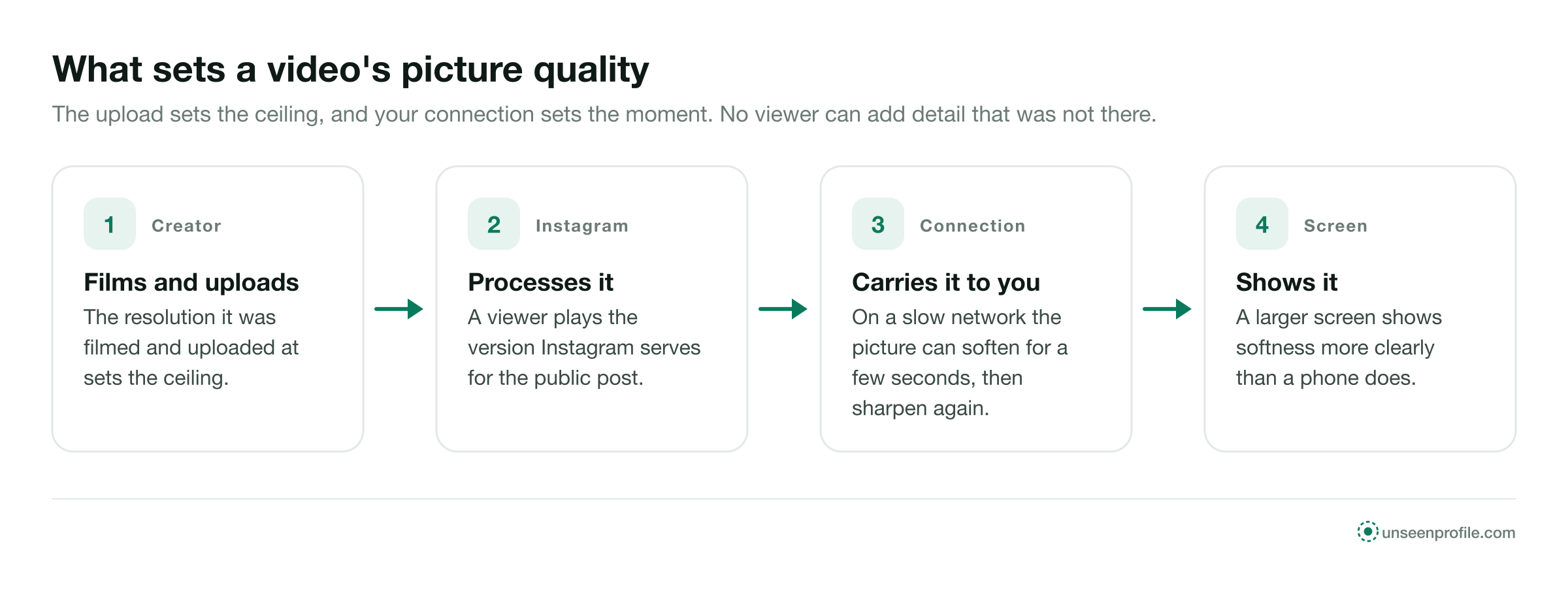
Four-step flow of video quality: the creator's upload, Instagram's processing, your connection and your screen
The four things that decide how sharp a public Instagram video looks in your browser. Free to share with a link to this page.
Where videos sit

Five places a video can be on a public profile.

Instagram now shares most new video posts as reels, but videos still turn up in several places. A video viewer opens all of them on a public account.

The main grid

Videos posted to the profile, mixed with photos, each one marked as a video in the corner.

The reels tab

Every reel the account has posted, newest first, in the tab beside the grid.

Inside carousels

A carousel can mix photos and videos. Each video slide plays when you reach it.

Live stories

Video stories play for 24 hours after they are posted, then leave the profile.

Highlights

Video stories the owner saved under the bio, for as long as the owner keeps them there.

No record of the watch

Playing any of them adds to a count at most. It never adds your name to anything the owner reads.

How it works

Watch a public video in three steps.

The same on a phone, a tablet or a computer, with no Instagram login.

  1. 1

    Type the public username

    Enter the handle of the account whose videos you want to watch. The viewer needs nothing else.

  2. 2

    Pick the video

    The profile opens with its grid and its reels. Videos carry a small marker in the corner of their tile.

  3. 3

    Play it with sound

    The video plays in your browser. Tap once for sound, pause, scrub back, and read the caption and comments under it.

Sound

Why a video can start silent, and how to hear it.

Sound is the most common question about videos in a browser. Four facts cover it.

  1. Browsers start many videos muted

    Most browsers do not let a page start a video with sound until you interact with it. Tap or click the video once to turn the sound on.

  2. The phone's silent switch

    On some phones, the silent switch or a low media volume keeps a browser video quiet. Check the media volume, not the ringer.

  3. The audio line names the sound

    Under a reel, a line names the track it uses, or says original audio when the creator recorded the sound themselves.

  4. A viewer plays the sound as posted

    It cannot add, change or remove the sound on a video. Some creators post a video with music only, or with no sound at all.

Headphones in a quiet place

A browser plays the sound through whatever the device uses for media, so headphones work the same way they do for any website.

Captions on the video

Many creators write their words on the video itself. Those play with the picture, sound on or off.

Picture quality

The upload sets the ceiling. Your connection sets the moment.

A viewer plays the video Instagram serves for a public post. The sharpest it can ever look is the version the creator uploaded, after Instagram has processed it. Nothing in a browser or a viewer can add detail that was not there.

Within that ceiling, your connection decides what you see. On a slow network the picture can soften for a few seconds while the video catches up, then sharpen again. A larger screen shows any softness more clearly than a phone does.

Who controls it
The resolution it was filmed and uploaded atThe creator
How it is processed for InstagramInstagram
How fast it reaches youYour connection
How big it is shownYour screen and window
Making it sharper than the uploadNobody
Watching and reacting

Watching is silent. A like or a comment carries your name.

Each action around a video either adds to a number or adds a name. Only the second kind reaches the owner as you.

Your name shown to the owner
Playing a video in the grid or reelsNo, a count only
Pausing, replaying or scrubbingNo
Reading the commentsNo
Liking the videoYes, by name
Commenting on itYes, beside the comment
Watching a video story while signed inYes, on the story's viewer list
Professional accounts see totals, not names

A business or creator account has insights for each video, with counts such as views and reach. Insights count people; they do not list who watched.

Kinds of video

How each kind of video behaves for a visitor.

The clock and the audience differ from one kind to the next. Here is what a visitor to a public account can expect.

How long it staysWhat the owner sees
A video post or reelUntil the owner removes itA count, no names
A video in a carouselAs long as the post staysA count for the post
A video story24 hoursNames of signed-in viewers for 48 hours
A video in a highlightUntil the owner removes itAs a story: names for 48 hours after posting
A live broadcastWhile it runs, then a replay if sharedNames of accounts that join
A private account's videos stay closed.

Videos, reels and stories on a private account are shown only to followers the owner approved. A site that offers to play them is not telling the truth.

A video over time

What happens to a video post after it goes up.

A video post has no 24-hour clock. It stays on the profile until the owner changes it.

  1. 1
    When it is posted

    It joins the profile

    The video appears in the grid or the reels tab, or both. On a public account, anyone can play it from then on.

  2. 2
    While it is up

    The counts keep moving

    Views, likes and comments grow as people find it. The owner can hide the like count, turn comments off or pin the video to the top.

  3. 3
    If it is removed

    It leaves the profile

    An owner can archive or delete a video. A viewer shows the profile as it is when you open it, so a removed video no longer appears.

0 names

Behind a video's view count

24 h

A video story stays live

48 h

The owner can read a story's viewer list

Who uses it

Four ordinary reasons to watch videos in a browser.

Emma CarterA recipe at the stove
Example
The situation
Emma was cooking from a chef's video and wanted it on her laptop on the counter, with the sound up.
What they did
She opened the chef's public account in her browser, played the video full size and paused it at each step.
Daniel MoreauA supplier's workshop
Example
The situation
Daniel was choosing a coffee roaster and wanted to see how each one worked before visiting.
What they did
He watched the longer videos two roasters had posted of their workshops and booked a visit with the one that showed its whole process.
Claire DuboisA fabric up close
Example
The situation
Claire wanted to see how a linen fabric moved before ordering a roll for her boutique.
What they did
She played the supplier's videos on a large screen, where the weave showed more clearly than in the photos.
Lena HoffHer niece's recital
Example
The situation
Lena has no Instagram account. Her niece's music school posted a video of the recital on its public profile.
What they did
Her sister sent her the link, and she watched the video in her phone's browser with the sound on.
Is it right for you

Good for, not for.

A video viewer is good for

  • Watching public videos and reels with sound, with no login
  • Watching on a laptop or a large screen
  • Pausing and scrubbing at your own pace
  • Reading the caption and comments under a video

It is not for

  • Playing videos from a private account
  • Showing who watched a video
  • Making a video sharper than its upload
  • Liking, commenting or following
Quick answers

Smaller questions about videos.

Is a video post different from a reel?

Both play the same way for a visitor. Instagram now shares most new video posts as reels, so most videos sit in both the grid and the reels tab.

Can I watch full screen?

Yes. The browser's full-screen control works on a viewer the same way it does on any video page.

Why can I not find an older video?

The owner may have archived or deleted it, or the account may have gone private since.

Stay safe

Three rules for any video viewer.

Never type your Instagram password

A video viewer works from a public username. A page that asks for your Instagram login is after your account.

No codec or player to install

Every current browser plays these videos. A page that says you need to install a player first wants something else.

A video belongs to its creator

Watching is open to anyone on a public account. Posting someone's video again as your own needs their permission.

Questions

About videos.

Short answers to what people ask before they use an Instagram video viewer.

Can I watch Instagram videos without an account?
Yes, from public accounts. An Instagram video viewer plays them in the browser from the account's username, with no login and nothing to install.
Does the owner see that I watched their video?
No. A video shows a view count, a number with no names behind it, whether the person watching was signed in or not.
Can I watch longer videos, not only short reels?
Yes. Longer videos on a public account open in the same player as reels, with the caption, the comments and the sound.
Why does the video play without sound?
Browsers often start a video muted. Tap or click the video once to turn the sound on.
Why does the picture look soft?
A viewer plays the video Instagram serves for that post. A slow connection can lower the quality for a moment, and nothing can make a video sharper than the version that was uploaded.
Can I watch videos from a private account?
No. A private account's videos, reels and stories are shown only to followers the owner approved.
Does watching a video in a story show my name?
Only if you watch it while signed in to Instagram. A story's viewer list names signed-in accounts; a viewer plays public stories with no account of yours behind it.
Can I watch a video someone sent me as a link?
Yes, if the account is public. The link opens that video in the browser, and a viewer opens the account's other videos beside it.
Can I comment on a video without an account?
No. Liking and commenting need an account, and each one shows that account's name to the owner.
Is this site part of Instagram?
No. UnseenProfile is an independent guide and is not affiliated with Instagram or Meta.

Ready when you are

Look first. Stay unseen.

Type a public username and open the viewer. No Instagram login on your side, no name on theirs.

A woman relaxing on a sofa, looking at her phone
Open the viewer