


- The situation
- Claire stocks postcards in her boutique and wanted to see an illustrator's full range. Her usual viewer showed an endless loading screen.
- What they did
- She typed the same username into a second viewer, which loaded the grid, and she picked six designs to order.

Picuki alternative
For browsing a public Instagram profile and its posts without an account: what sites of this kind do, what an error or an empty grid usually means, and how to choose another viewer that loads.

What can you use when Picuki is not loading?
A browser viewer for public profilesProfile viewers of this kind open a public account's header, grid, captions and comments from a username, with no login. Read what the error says, check the account, then try another viewer that asks for nothing but the username.
- 1
Picuki is one of the names people search for when they want to browse a public profile without an account.
- 2
An empty grid, an error and an endless loading screen each point to a different cause.
- 3
This page covers profile viewers in general. It cannot report any site's current status.
- 4
UnseenProfile is independent and not affiliated with Picuki, Instagram or Meta.
A public profile, read like a catalogue.
People use sites of this kind to look through a public account the way they would leaf through a catalogue: the bio at the top, the grid of posts, each post opened with its caption and comments. You type a username, and the page loads what that account shows to any visitor.
No Instagram account is signed in on your side. Instagram does not record profile visits for anyone, and a viewer adds nothing to that. The limit is the same on every site of the kind: a private account shows its header and a lock, and nothing more.
Maison Claire@maison.claireLinen, made in small runs. Open Tuesday to Saturday.


Four reasons a profile viewer goes quiet.
These apply to the whole category. None of them is a statement about Picuki or any other single site.
Instagram blocks the way in
A viewer reads the public pages Instagram serves. Instagram works to limit automated access, and when it blocks the method a viewer relies on, profiles stop loading until the viewer is rebuilt.
Rate limits
Instagram allows only so many requests from one source in a set time. A viewer that reaches the cap can show empty grids or errors for a while, then recover.
A new web address
A site can move to another domain. Saved links and older search results keep pointing at the old one, which may show an error or unrelated content.
Overload
When many people use one viewer at the same time, pages can load slowly or time out until the traffic falls.
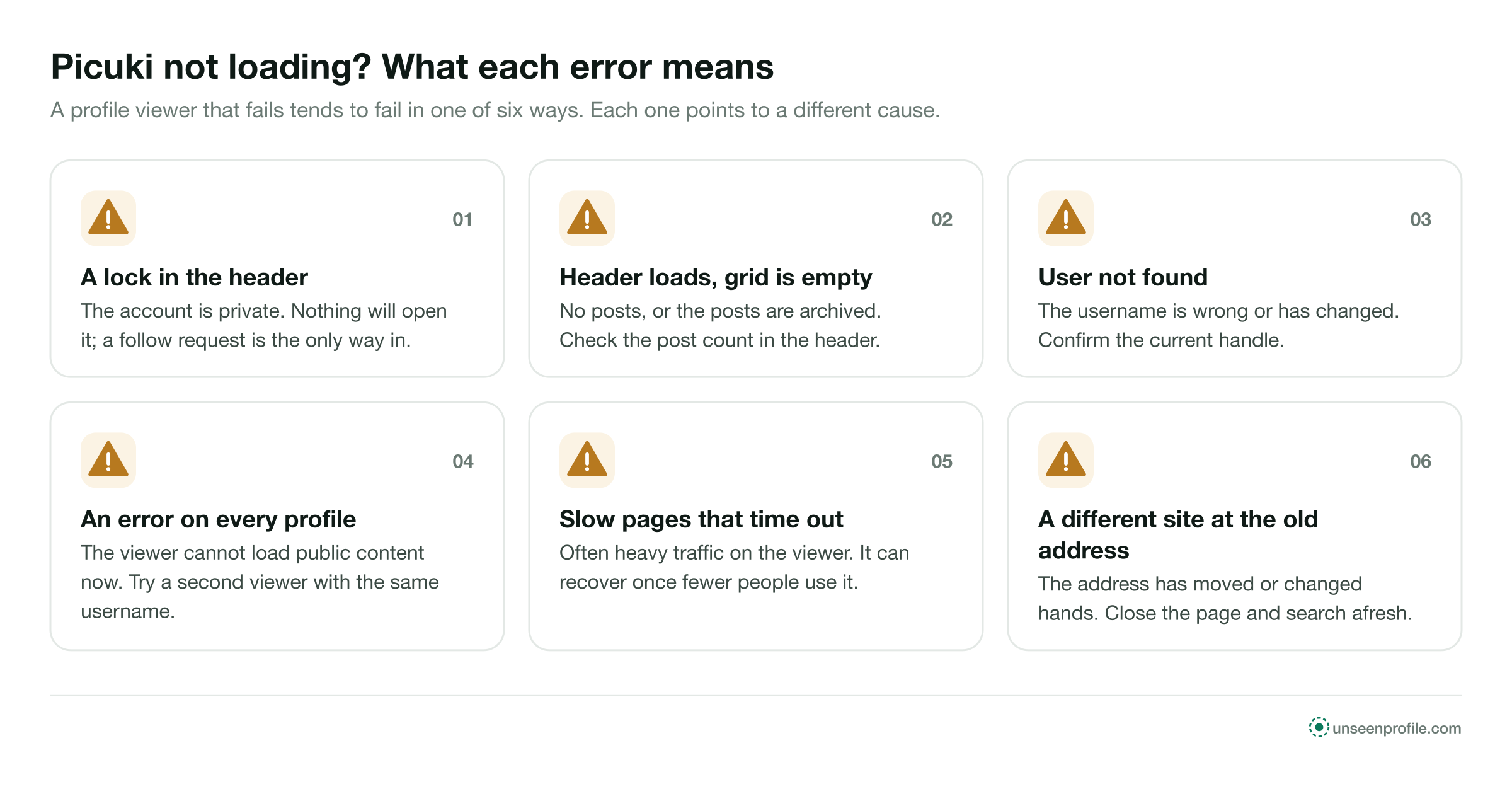
What each symptom usually means, and what to try.
A profile viewer that fails tends to fail in one of five ways. Each one points to a different cause.
Type a public account you have browsed before. If it loads, the viewer works and the problem is with the account you wanted. If it does not, the viewer is the cause.
Four checks before you leave a viewer.
These take a minute and rule out the account before you blame the site.
- Step 1
The handle
Copy the username from the person's or the business's website, card or email signature, where it is current.
- Step 2
The lock
If the header shows a lock, the account is private. No site will load more than the header.
- Step 3
The post count
A count of zero, or a low count, means there is little or nothing to show.
- Step 4
A second viewer
If all three are in order, type the same username into another browser viewer.
Browse a public profile in three steps.
The same with any sound viewer, on a phone, a tablet or a computer.
- 1
Type the username
Enter the public account's handle. No email address and no Instagram password are needed.
- 2
Check the header
The picture, name, bio and counts confirm the account before you scroll.
- 3
Open the posts
Scroll the grid and open any post for its full image or video, its caption and its comments.
What a sound alternative looks like.
Each check is visible on the first screen, before you type anything. A viewer that passes all five is built for public profiles. A page that fails one is a page to close.
Three ways to browse a public profile, compared.
Each one shows a different amount and asks for a different thing in return.
What a sound profile viewer shows, and what should make you leave.
The left column is what to expect from a viewer built for public profiles. The right column lists the red flags.
Signs of a sound viewer
- Asks for a public username and nothing more
- Shows the header first, so you can check the account
- Says private accounts stay closed
- Explains what it records in a privacy policy
- Loads in a phone browser with nothing installed
Red flags
- A login form for your Instagram account
- A survey or offer before the profile loads
- A prompt to install an app or extension
- A promise to open private profiles
- A request to allow notifications before anything shows
Words you will meet when browsing a profile.
The same words appear on Instagram and on every viewer.
- Public account
- An account anyone can open. Its posts, reels, stories and highlights are what a viewer can load.
- Private account
- An account whose content goes only to followers the owner approved. Its header stays public.
- Header
- The top of a profile: picture, name, username, bio and the post, follower and following counts.
- Grid
- The posts on a profile, newest first, as photos, carousels and videos.
- Carousel
- One post with several photos or videos, opened one slide at a time.
- Tagged tab
- Posts other accounts made and tagged this account in.
- Archive
- Where an owner moves a post to hide it from the profile without deleting it.
Four people who browse public profiles.
Each example is about a public account and a viewer that stopped loading.
- The situation
- Emma follows a vintage shop that posts new stock in its grid. A viewer told her the user was not found.
- What they did
- She checked the shop's website, saw it had changed its handle, and opened the new username.
- The situation
- Daniel wanted to look through a cheese maker's posts before a first order. One page asked him to sign in with Instagram.
- What they did
- He closed it without typing anything and used a viewer that asked only for the username.
- The situation
- Lena opened her town museum's profile and saw a header with a lock and no posts.
- What they did
- The museum's account was private. She found its public events account on the museum's website instead.
What an alternative is for.
An alternative is good for
- Browsing a public profile, its grid and its posts
- Reading captions and comments on public posts
- Checking a shop or supplier without an Instagram account
An alternative is not for
- Opening a private profile
- Liking, commenting or following
- Checking whether a site is online right now
UnseenProfile is an independent guide. It is not affiliated with Picuki, Instagram or Meta. This page covers profile viewers in general, cannot report any site's current status, and makes no statement about the safety or ownership of any other site.
About Picuki alternatives.
Short answers to what people ask when a profile viewer stops loading.
What can I use instead of Picuki?
Is Picuki down right now?
Why does a profile viewer show an empty grid?
Can an alternative open a private profile?
Does the owner see that I browsed their profile?
Can I read captions and comments with an alternative?
Can I scroll back to an account's oldest posts?
Do I need to install anything?
What if a page asks me to log in with Instagram?
Is UnseenProfile connected to Picuki?
Look first. Stay unseen.
Type a public username and open the viewer. No Instagram login on your side, no name on theirs.