- The situation
- Claire wanted to stock a potter's mugs and looked up the studio's profile to see how often it posted. Her usual analytics page showed blank figures.
- What they did
- She typed the username into a profile viewer, read the dates on the grid, and saw the studio posted new work every week.
Gramhir alternative
Some profile viewers present a public account as a page of numbers: followers, post history, worked-out rates. What Instagram makes public, which figures a site has to work out for itself, and how to choose another viewer when one stops loading.

What can you use when Gramhir is not loading?
A profile viewer that shows what is publicA browser viewer opens a public account's header, counts and dated posts from a username, with no login. It cannot show figures Instagram keeps to itself, such as who visited the profile, and any rate it adds is the site's own calculation.
- 1
Gramhir is one of the names people search for when they want a public profile's numbers and post history without an account.
- 2
Instagram makes counts, posts and dates public. Growth charts and rates are worked out by the site.
- 3
This page covers analytics-style profile viewers in general. It cannot report any site's current status.
- 4
UnseenProfile is independent and not affiliated with Gramhir, Instagram or Meta.

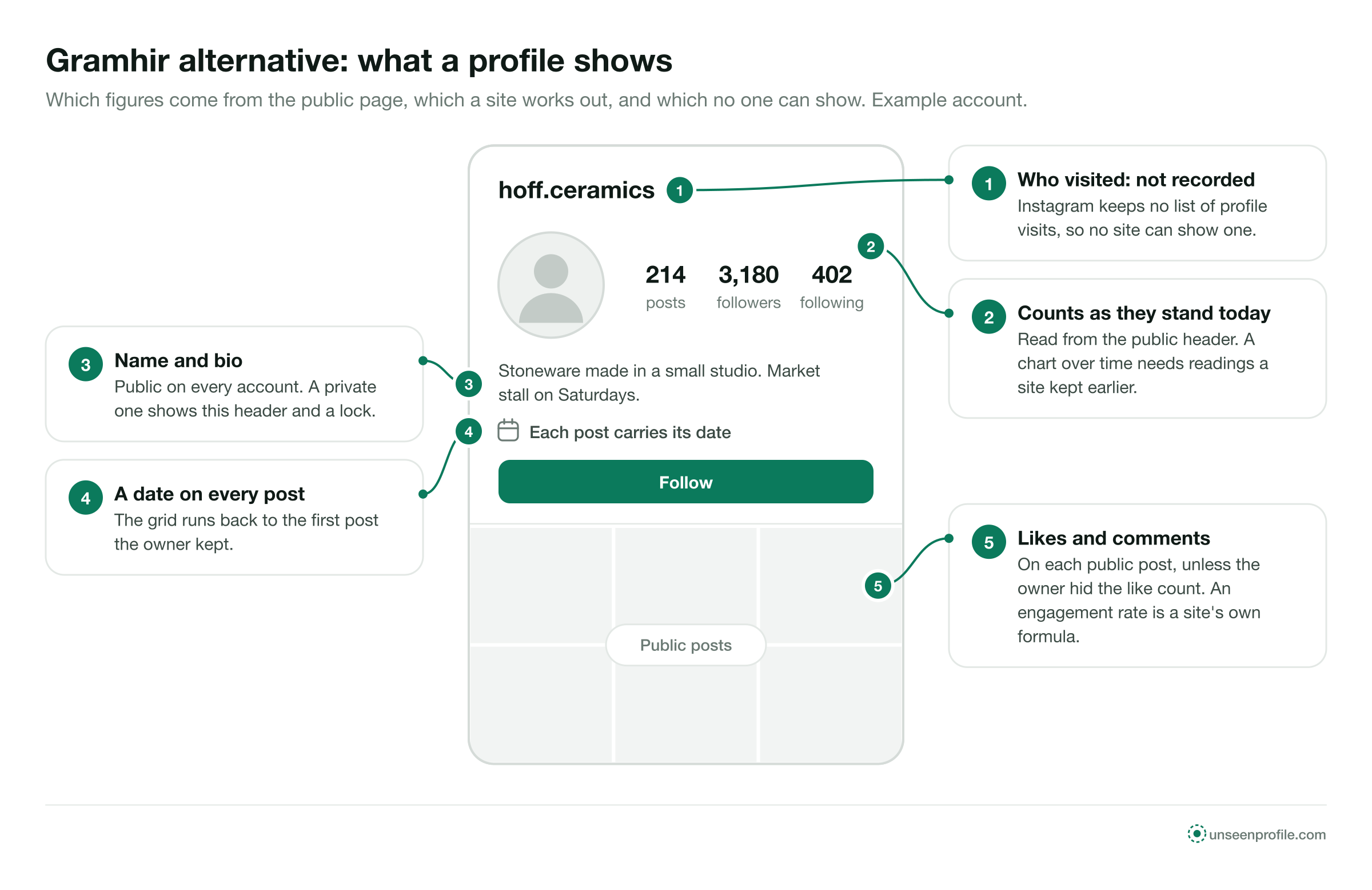
Every figure starts in the profile header.
Analytics-style viewers take the same public page any visitor sees and lay it out as figures. The post count, the follower count and the following count sit in the header. The grid gives each post a date, and public posts carry their likes and comments unless the owner hid them.
Anything beyond that is the site's own work. A chart of followers over time needs earlier readings; an engagement rate needs a formula the site chose. When such a viewer stops loading, the header and the grid are still there for any viewer to open.
Hoff Ceramics@hoff.ceramicsStoneware made in a small studio. Market stall on Saturdays.


Public, worked out, or not available to anyone.
Some figures come straight from Instagram's public page. Some are calculated by the site. Some Instagram does not give out at all.
Because each site picks its own formula, the same account can show a different engagement rate on two analytics pages on the same day. The likes and comments under each post are the figures to read.
Six things a profile viewer opens from a username.
Every sound viewer of this kind works from the same public page. These are the parts it can lay out for you.
The header
Picture, name, username, bio and the three counts at the moment you look.
The dated grid
Every public post, newest first, each with the day it was published.
Captions and comments
The full caption and the comments under each public post.
Carousels and reels
Each slide of a carousel and each reel on the grid.
Highlights
Saved stories under the bio, for as long as the owner keeps them.
Nothing private
A private account shows its header and a lock. The rest stays with approved followers.
Four reasons a profile viewer shows no numbers.
These apply to analytics-style viewers as a group. None of them is a statement about Gramhir or any other single site.
Instagram blocks the route
A viewer reads the public pages Instagram serves. Instagram works to limit automated access, and a site that reads many profiles is the kind it limits. When the route is blocked, profiles stop loading until the site changes its method.
Rate limits
Instagram caps the requests one source may make in a set time. A site that reads counts for many accounts can reach that cap and show blank figures until the window resets.
A new address
A viewer can move to another domain. Saved links and older search results keep pointing at the old one, which may show an error or other content.
Heavy traffic
When many people look up profiles at once, a viewer can slow down or time out, then recover once the load falls.
Four questions before you switch.
Blank numbers often come from the account. Ask these in order.
Is the handle current?
Usernames change. Copy the handle from the person's or the business's own website, card or email signature.
Is the account public?
A lock in the header means private. The counts show, the posts do not, on every site.
Are the like counts hidden?
If the posts load but show no likes, the owner chose to hide them. No site can show that figure.
Does a known account load?
Type a public account you have looked at before. If it fails too, the viewer is the cause, and a second viewer is next.
Read a public profile in three steps.
The same with any sound viewer, in a phone or computer browser.
- 1
Type the username
Enter the public account's handle. No email address, no payment details and no Instagram password are needed.
- 2
Read the header
Picture, name, bio and the three counts confirm the account and give you the figures as they stand today.
- 3
Scroll the dated grid
Each post shows its date, caption, likes and comments, so you can see how often the account posts and what draws a response.
What a sound alternative looks like.
Each check can be made on the first screen. A viewer that passes all five is built for public profiles; a page that fails one is not worth the visit.
A public username only
No email, no phone number and no account of your own.
No password
Never your Instagram login, at any step, for any feature.
No app install
It runs in the browser, with no app or extension.
Honest about private accounts
It says a private account shows its header and nothing more.
Works on a phone
The header and grid load in a phone's own browser.
Then test it
Type a public account you know, and compare the counts with what you saw before.
Three ways to read a public profile, compared.
Each one shows a different amount and asks for something different in return.
Four offers that should make you leave.
Each one promises a figure Instagram does not give out, or asks for something a public profile does not need.
Instagram does not record profile visits for anyone. A page that offers the list has nothing to show.
Past counts exist only where someone read them at the time. A full history for an account no one tracked is made up.
Public counts need no login. A field for your Instagram password collects accounts.
Those stay with approved followers. The header is all any site can show.
Words you will meet on profile analytics pages.
Some are Instagram's own words. Others belong to the site that uses them.
- Follower count
- The number in the header of people who follow the account, as it stands when the page loads.
- Following count
- The number of accounts this account follows.
- Post count
- The number of posts on the grid. Archived posts are not counted.
- Post history
- The dated grid, newest first, back to the first post the owner kept.
- Engagement rate
- A site's own calculation from likes, comments and followers. Not an Instagram figure.
- Growth chart
- Counts a site read at different times, drawn as a line. It starts from the site's first reading.
- Hidden like count
- An owner's setting. The post shows comments but no number of likes.
Four people who wanted a profile's numbers.
Each example is about a public account and a viewer that stopped loading or offered more than it could.
- The situation
- Daniel was choosing between two venues and wanted to compare how people responded to their posts. One page offered a growth chart going back years.
- What they did
- He read the likes and comments under each venue's recent posts instead, which came straight from the posts themselves.
- The situation
- Emma was booking a wedding photographer and wanted to see the full grid. The viewer she tried asked her to sign in with Instagram.
- What they did
- She closed it without typing anything and used one that asked only for the username.
- The situation
- Lena looked up a bakery's account and saw its follower count but no posts at all.
- What they did
- The header showed a lock. The account was private, so she found the bakery's opening hours on its website instead.
What an alternative can show, and what it cannot.
An alternative is good for
- Public counts as they stand today
- A dated grid of public posts
- Likes and comments the owner left visible
- Looking at a profile with no account of your own
An alternative is not for
- Who visited a profile
- Counts from before anyone read them
- A private account's posts or lists
- Telling you whether a given site is up right now
UnseenProfile is an independent guide. It is not affiliated with Gramhir, Instagram or Meta. This page covers analytics-style profile viewers in general, cannot report any site's current status, and makes no statement about the safety or ownership of any other site.

About Gramhir alternatives.
Short answers to what people ask about a public profile's numbers.
What can I use instead of Gramhir?
Why is Gramhir not working?
Can a viewer show an account's follower count?
Can a viewer show how the follower count changed over time?
Is an engagement rate an Instagram figure?
Can I see when each post went up?
Why do some posts show no like count?
Does the owner see that I looked at their numbers?
Can an alternative show a private account's numbers?
Is UnseenProfile connected to Gramhir?
Look first. Stay unseen.
Type a public username and open the viewer. No Instagram login on your side, no name on theirs.