Viewers / Profiles

Inflact alternative

Some sites bundle many Instagram tools behind one sign-up. Looking at a public profile is not one of the tasks that needs it. What a viewer may fairly ask for, why viewers of this kind stop loading, and how to choose another one.

Moreau Keys@moreau.keys · Example account
Example post: a woman choosing among several keys on a hook rack
To look A username, nothing more

What can you use when Inflact is not working?

A viewer that asks for a username and nothing else

To look at a public profile, its posts and its stories, a browser viewer needs the username. No account, no Instagram password, no email address and no payment details. Check the account is public, then try a viewer that passes the five checks on this page.

Key points
  1. 1

    Inflact is one of the names people search for when they want to view a public Instagram profile.

  2. 2

    Tool sites of this kind can bundle many features behind one sign-up. Viewing a public profile needs none of it.

  3. 3

    This page covers sites of this kind in general and cannot report any site's current status.

  4. 4

    UnseenProfile is independent and not affiliated with Inflact, Instagram or Meta.

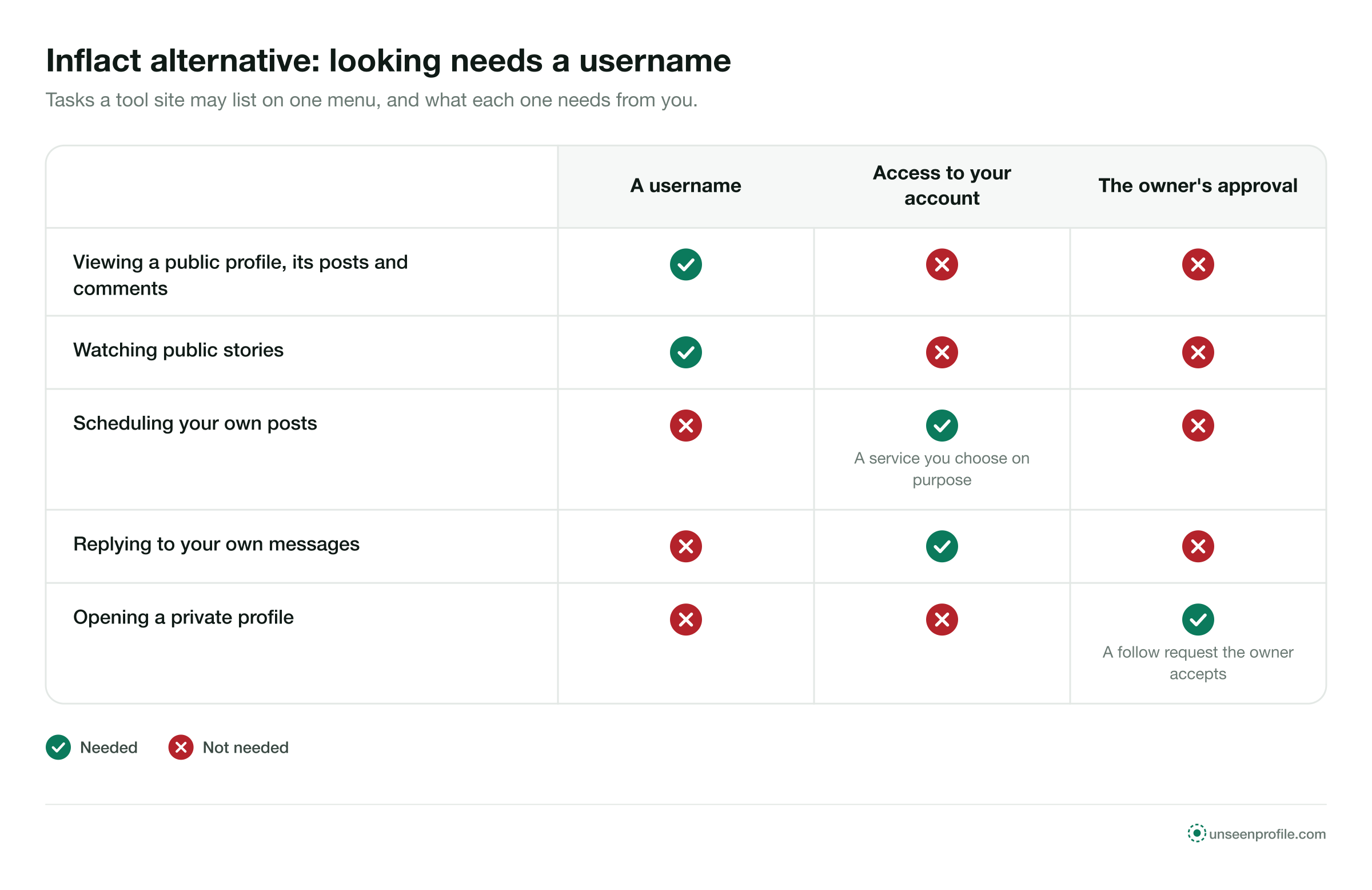
Table: public profiles and stories need only a username; own-account tasks need access; private profiles need approval
What each kind of Instagram task needs from you, showing that looking at a public profile needs no sign-up. Free to share with a link to this page.
One task, one thing to give

What each kind of Instagram tool needs from you.

Tool sites often list very different tasks on one menu. The tasks are not alike: some act on your own account, and some only look at someone else's public page.

Acts onWhat it needs
Viewing a public profileSomeone else's public pageA username
Watching public storiesSomeone else's public pageA username
Reading public posts and commentsSomeone else's public pageA username
Scheduling your own postsYour own accountAccess to your account
Replying to your own messagesYour own accountAccess to your account
Opening a private profileSomeone else's private pageOnly the owner's approval
The first three rows are what a viewer does

A viewer looks at public pages. Anything that acts on your own account belongs to a different kind of service, chosen separately and on purpose.

What a viewer may ask for

One field, and a list of things it never needs.

Read the first screen of a viewer against this list. Anything outside the first row is a request the viewer does not need.

Fine to give
A public username
Never needed
Your Instagram passwordAn account with the siteCard or payment details
Not needed either
Your email addressYour phone numberNotification permissionAn app or extension

Why a username is enough

A public profile is open to any visitor, so the handle is all a viewer needs to find it.

Why a password is never needed

Your password opens your own account. Looking at another account's public page does not involve yours.

When a page asks for more

What each extra request is usually for.

If a page asks for something before it shows a public profile, it helps to know what that request does for the page.

Create an account to continue
An account gives the site a way to recognise you on each visit and to contact you. It adds nothing to a public profile, which any visitor can already see.
Enter your email address
An email address lets the site send you messages. A public profile loads without it.
Sign in with Instagram
A sign-in hands the page access to your own Instagram account. Looking at someone else's public profile needs no access to yours.
Add a card to unlock
A card form in front of a public profile asks you to pay for something any visitor can see. It cannot open a private account either.
Allow notifications
Notifications let the site reach your screen later. A public profile loads without them; decline the prompt.
Why they stop loading

Four general reasons, none of them about one site.

These apply to viewers and tool sites of this kind as a group. This page makes no statement about Inflact or any other single site.

  1. Blocked by Instagram

    Instagram limits automated access to its pages. When it blocks the route a site uses to read public profiles, those profiles stop loading until the site changes its method.

  2. Rate limits

    Instagram caps the requests one source may make in a given time. A site that serves many tools from one source can reach the cap and show empty profiles until it resets.

  3. A move to a new address

    A site can change domain. Saved links and older search results keep pointing at the old address.

  4. Overload

    When many people use a site at once, pages can slow down or time out, then load again when traffic falls.

What to check first

Four checks, in order, before you try another site.

Most blank profiles have a cause in the account. Rule that out first.

  1. Step 1

    The username

    Copy the current handle from the person's or the business's own website or card.

  2. Step 2

    Public or private

    A lock in the header means private. No site, paid or not, opens the rest.

  3. Step 3

    The post count

    A count of zero means nothing to show, on any site.

  4. Step 4

    A second viewer

    If all three are in order, type the username into a viewer that asks for nothing else.

How it works

Three steps, and no form to fill in.

The same with any sound viewer, on a phone, a tablet or a computer.

  1. 1

    Type the username

    Enter the public account's handle. That is the only field a viewer needs.

  2. 2

    Nothing else to fill in

    No account form, no email, no card and no Instagram password come between you and the profile.

  3. 3

    Open the profile

    The header, grid, highlights and live stories load in the browser, with no record of your visit for the owner.

Five checks

Five checks, all on the first screen.

A viewer built for public profiles shows you the username field first. A page built to collect something shows a form first. The five checks tell the two apart before you type.

A viewer built for lookingA page to close
What it asks forA public username onlyAn account, an email or a card
Your Instagram passwordNever asked forAsked for to continue
Installing anythingNothing, it runs in the browserAn app or an extension
Private accountsSays they stay closedOffers to open them, often for a fee
On a phoneWorks in the phone's browserOnly through an app
Your options

Three ways to look at a public profile, compared.

Each one asks for something different. Only one asks for nothing of yours.

Another viewer siteInstagram, logged outA second account
Profile header and bio Yes Yes Yes
The full grid of posts YesSome, then a login prompt Yes
Public stories and highlights YesLogin neededSigned in: your name on story lists
Needs an account of yoursNoNoYes, a second Instagram account
Needs payment detailsNoNoNo
Opens private accounts No NoOnly if the owner approves it
Signs to stay or leave

What a sound viewer shows, and what should make you leave.

The left column is what to expect from a viewer built for public profiles. The right column lists the red flags.

Signs of a sound viewer

  • A username field on the first screen
  • The profile header before anything else
  • A plain statement that private accounts stay closed
  • A privacy policy you can read without signing up
  • Nothing to install

Red flags

  • An account form before the profile loads
  • A card form to unlock a public profile
  • A request for your Instagram password
  • A paid plan that promises private profiles
  • A prompt to allow notifications before anything shows
Who looks for one

Four people who were asked for more than a username.

Each example is about a public account and a page that wanted something first.

Emma CarterA florist for a birthday
Example
The situation
Emma wanted to see a florist's recent bouquets. The page she opened asked her to create an account before showing the profile.
What they did
She closed it and typed the florist's username into a viewer that showed the grid straight away.
Daniel MoreauA locksmith's reviews
Example
The situation
Daniel needed a locksmith and wanted to look at one's posts and the comments under them. A page asked for a card to unlock the comments.
What they did
He left without entering anything and read the public comments in a browser viewer instead.
Lena HoffA yoga teacher's timetable
Example
The situation
Lena wanted a yoga teacher's weekly timetable, posted as a story. A tool site asked her to sign in with Instagram.
What they did
She used a viewer that asked only for the username and read the timetable before her lunch break ended.
Claire DuboisA private account and a paid plan
Example
The situation
Claire wanted to see a private account's posts, and one site offered a paid plan to open them.
What they did
She knew private posts go only to approved followers, so she sent a follow request instead and waited.
In short

Three questions, three answers.

Do you need an account to look at a public profile?

No

A username is all a viewer needs. An account with the viewer site adds nothing to what you can see.

Should a viewer ever ask for card details?

No

A public profile is open to any visitor. A card form in front of it serves the page.

Can any plan open a private account?

No

Private posts and stories go only to followers the owner approved, on every site.

Independent, not affiliated with Inflact.

UnseenProfile is an independent guide. It is not affiliated with Inflact, Instagram or Meta. This page covers viewers and tool sites of this kind in general, cannot report any site's current status, and makes no statement about the safety or ownership of any other site.

Questions

About Inflact alternatives.

Short answers to what people ask when a page wants a sign-up before a profile.

What is an Inflact alternative for viewing profiles?
A browser viewer that opens a public Instagram profile, its posts and its stories from a username alone, with no sign-up, no login and no payment details.
Why is Inflact not working?
This page cannot report the status of Inflact or any other site. Viewers of this kind stop loading for general reasons: Instagram blocks or limits their requests, they reach rate limits, they move address, or they are overloaded.
Do I need an account to view a public Instagram profile?
No. A public profile is open to any visitor. A viewer needs the username and nothing else, so an account with the viewer site adds nothing to what you can see.
Why would a viewer ask for my card details?
Looking at a public profile costs the viewer nothing that a card would cover. A card form in front of a public profile serves the page, not the look you came for.
Is a sign-up ever needed?
For tools that act on your own Instagram account, such as scheduling your posts, a service needs access to that account. Looking at someone else's public profile is a different task and needs none of it.
What is the difference between an account and a password?
An account with a viewer site is a new login you create there. Your Instagram password is the key to your own Instagram account. A viewer should ask for neither.
Can a paid plan open private accounts?
No. A private account's posts, stories and lists go only to followers the owner approved. Paying a site does not change who the owner approved.
Does the owner see that I looked?
No. Instagram does not record profile visits, and a browser viewer plays public stories with no account behind them, so no name reaches the story's viewer list.
Do I need to install anything?
No. A sound viewer runs in a phone or computer browser. Nothing to download, no extension.
Is UnseenProfile connected to Inflact?
No. UnseenProfile is an independent guide and is not affiliated with Inflact, Instagram or Meta.

Ready when you are

Look first. Stay unseen.

Type a public username and open the viewer. No Instagram login on your side, no name on theirs.

A woman relaxing on a sofa, looking at her phone
Open the viewer